
The Big News
On October 7, 2026, OpenAI announced a new interface for ChatGPT called Intelligent UI. It is rolling out alongside the new GPT-6 model and embeds a large number of visual elements directly into users' conversations. According to the company, these are not just flat images: you can interact with them directly — clickable buttons, calculators customized for specific tasks, interactive diagrams and editable charts appear right inside the conversation.
According to TechCrunch, the new interface launched on Wednesday alongside the GPT-6 model. A post dated October 7 on the company's official LinkedIn page confirmed that the GPT-6 Sol model runs on Plus, Pro, Business and Enterprise plans, while GPT-6 Luna runs on Free and Go.
The change comes against the backdrop of ChatGPT having been a mostly text-based interface until now: the model now creates a topic-matched visual alongside the response text and places it directly into the flow of the conversation.
How the Interface Works
In Intelligent UI, artificial intelligence (AI) itself creates a visual matched to the conversation topic and embeds it into the response text. The visual appears not as a separate block but as a natural continuation of the dialogue: the user can press a button, edit chart values or interact directly with diagram elements. The text remains — interactive elements attach to it.
The company demonstrated the capabilities at an online briefing with journalists; the main presentation was given by product manager Aarush Selvan. He cited the example of a college student: for a student wanting to understand how an airplane wing generates lift, the chatbot quickly created several diagrams showing how planes stay airborne. According to TechCrunch, the chatbot keeps adding such elements to the conversation — they become a natural part of the response.
"ChatGPT has been a mostly text-based interface until now. When people want to get something done — a daily recipe, planning a trip or learning something new — the most useful answers aren't text alone." — Aarush Selvan, OpenAI product manager (TechCrunch)
What Visuals Appear
According to TechCrunch, the visuals in Intelligent UI fall into several main types: clickable buttons (which perform an extra action without leaving the conversation), calculators customized for specific tasks (for example, a personal savings calculator performs computations right in the chat based on entered values), interactive diagrams and editable charts — you can change their values and watch the result update. OpenAI emphasizes that these differ from flat, cartoon-style images — each visual becomes an active part of the dialogue; there's no need to open a separate window to view them.
The demo also showed everyday situations beyond education: visuals for recipes, a diagram explaining bicycle mechanics and a map for a multi-day hiking trip. According to TechCrunch, there are additional examples beyond those listed — showing that the interface is not limited to education.
Learning Modules: More Than 70 Topics
Much of the new functionality is aimed at education: OpenAI has released a set of interactive tools covering more than 70 core math and science topics. When a user asks about a topic, the chatbot creates a dynamic module with adjustable sliders alongside the written explanation: as a variable is dragged, equations, graphs and diagrams update in real time.
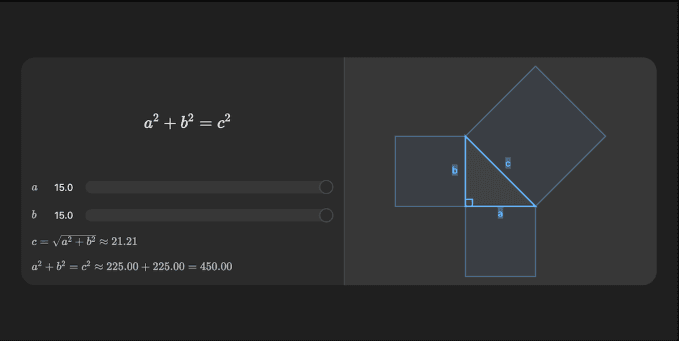
According to VentureBeat, the modules cover topics ranging from the Pythagorean theorem to Ohm's law to compound interest. For example, when the Pythagorean theorem is requested, the system shows on the left the formula a² + b² = c² with sliders for sides a and b, and on the right a visualization of a right triangle whose shape changes dynamically as values change; the computed hypotenuse length updates in real time. The same approach applies to voltage and resistance in Ohm's law, pressure and temperature in the ideal gas law, and radius and height in the volume of a cone. The VentureBeat article specifically notes the current and resistance sliders of the Ohm's law module and the real-time-updating circuit visualization (image: OpenAI).
The initial list targets middle-school and early-college material: binomial squares, Charles's law, Coulomb's law, exponential decay, Hooke's law, kinetic energy, linear equations and more. Each module comes with a written explanation — the visual doesn't replace the text but complements it.
These modules are built on top of ChatGPT's existing learning features — "study mode" for step-by-step problem solving and quizzes for exam preparation. OpenAI said it plans to expand interactive learning to other subjects in the future.
Why the Focus on Education
The choice of education as a focus is no accident: according to VentureBeat, OpenAI reported that 140 million people use ChatGPT each week to learn math and science. The conclusion of the research the company relies on reads:
"Visual and interactive learning may give most students stronger conceptual understanding than traditional instruction." — Conclusion of the research cited by OpenAI (VentureBeat)
A Gallup poll is also cited, in which more than half of US adults say they struggle with math. In early tests, students said the modules helped them understand the relationships between variables; middle-school math teacher Anjini Grover specifically highlighted the emphasis on conceptual understanding, while algebra teacher Raquel Gibson highlighted the ability to learn abstract concepts independently.
Rollout Schedule and Models
Intelligent UI is rolling out globally alongside GPT-6. The rollout is phased: paid subscriptions — Pro, Plus, Business and Enterprise — started on Wednesday, October 7; free and cheaper Go plan users will get it on Thursday, October 8. According to VentureBeat, the interactive learning tools are open to logged-in users on all plans, including the free tier.
The new feature is not mandatory: users can reduce the amount of visuals in responses and continue in the previous text style — the interface can be customized to their preference.