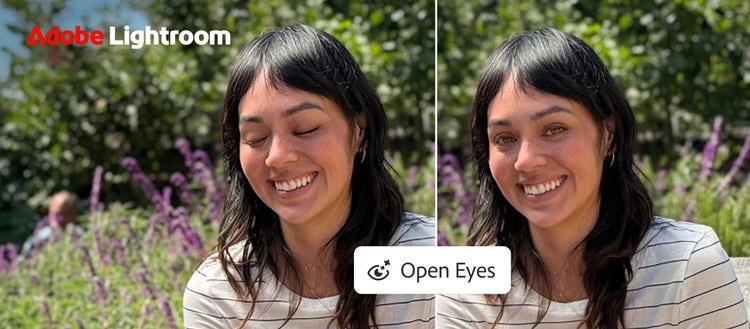
The Adobe Lightroom mobile app has gained a new generative artificial intelligence (AI) feature that opens closed eyes in photos with a single tap. The tool, called "Open Eyes" and announced by the company on October 19 in its official blog, appears on screen as a Quick Action as soon as the app detects closed eyes in a photo. According to The Verge, the feature works with both individual and group shots.
How "Open Eyes" Works
The feature is built into the mobile version of Lightroom and operates in fully automatic mode. When a user opens a photo, the app itself checks whether it contains closed eyes. If such a shot is found, an "Open Eyes" button appears on screen as a Quick Action — the fix only starts after the user taps it; no complicated settings or manual editing are required.
Quick Actions are Lightroom mobile's one-tap tools, and "Open Eyes" appears exactly in this lineup: the user won't get lost in menus — the right button is offered automatically.
According to Adobe, the feature uses generative AI to create a natural-looking result that matches the subject's lighting and pose. This isn't simply pasting a ready-made eye image into the frame: the system analyzes the lighting conditions in the photo, the shooting angle and the person's facial position, and generates an "open eyes" image from scratch that harmonizes with the rest of the shot. As a result, the fix looks like a natural part of the original frame rather than something artificially added.
"No complicated edits, no trying to recreate the scene — just save the shot and keep creating." — Adobe blog
The most notable aspect of the feature is personalization. If the user's Lightroom library contains other photos of the same person, "Open Eyes" matches eye color, shape and size to them. The correction therefore comes out more accurate and closer to the person's unique appearance. The feature works even without other photos in the library — in that case the system relies on the data in the shot itself. It's also worth noting that the feature is only offered in clear cases of closed eyes: that is, it appears on screen only when the app has analyzed the frame itself and decided a fix is needed; otherwise it doesn't interfere with the user's workflow.
As noted in the Adobe blog, the feature is aimed especially at shots that can't be retaken. For example, a group photo where everyone looks great except one person who blinked, a constantly moving child, or a moment of genuine laughter among friends — in such situations the chance to say "let's take it once more" doesn't always exist.
Which Devices Support It and What It Costs
"Open Eyes" is available in the iOS, iPadOS and Android versions of the Lightroom mobile app. The feature has taken its place among Quick Actions in the latest version of the app and requires no separate download or extra setup.
A limit applies to free users. According to The Verge, they get two tries to test the feature. After that, a prompt appears to switch to a Creative Cloud subscription for more AI tool credits. AI tool credits are a unit of account introduced by Adobe for its generative features: each generation consumes a certain number of credits. Subscribers keep using the feature within their allocated credits.
The fact that the feature launched specifically for the mobile app is no accident either. As emphasized in the Adobe blog, the new tools are meant to help users create a share-worthy result rather than worry about an imperfect shot — and all of it takes just a few taps.
A Decade-Old Idea — Now Done Generatively
Interestingly, the idea of fixing closed eyes is not entirely new for Adobe. As The Verge recalls, Adobe Photoshop Elements offered a similar feature for nearly a decade. But the old method worked completely differently: it copied the eyes from another photo of the same person and pasted them into the current frame.
This copy-based method didn't always produce good results. When the lighting conditions or facial expression differed, the pasted eyes looked "glued" onto the shot, and the final result was mixed. If the user couldn't find another suitable photo, the method didn't work at all.
The new "Open Eyes", by contrast, uses generative AI to recreate the eyes within the frame itself — tailoring them to its lighting, angle and the subject's pose. According to the Adobe blog, it is precisely this difference in approach that makes the result look natural. In this way, a solution that ten years ago relied on copying has today become a solution based on generation.